
XIYLO PRO 2.0 · WHAT’S NEW
Every Mac app.
Its own audio experience.
Version 2 has been submitted for App Store review. Check the App Store for release availability, then update the Mac and companion apps together.
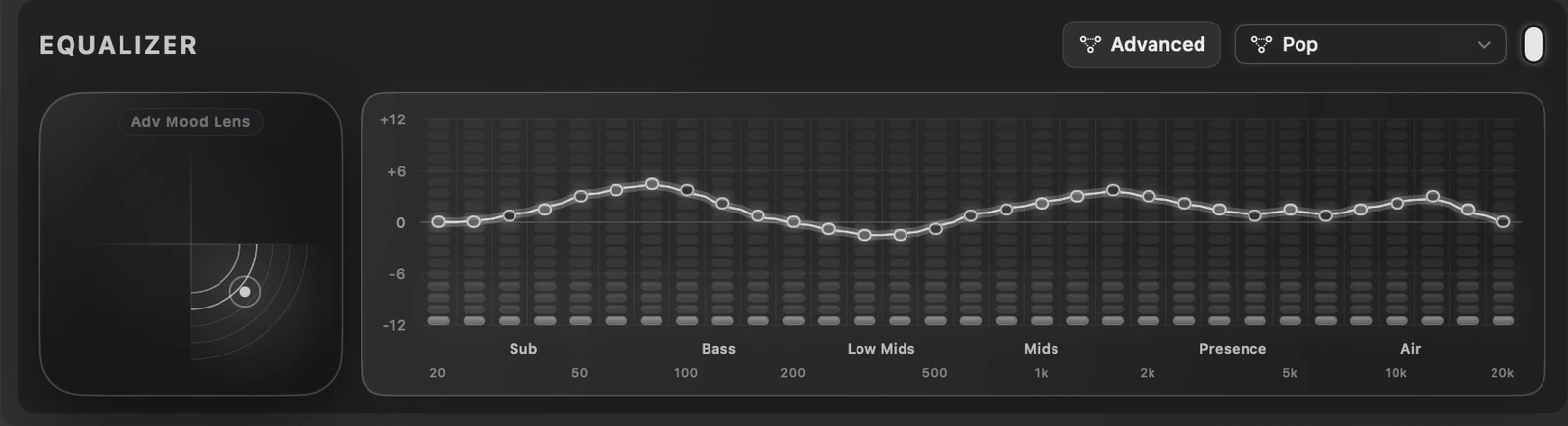
31-band Advanced EQ
Keep the 10-band Basic EQ or open 31-band Advanced EQ, spanning 20 Hz to 20 kHz. Tune each Mac app independently. Advanced EQ bypasses the EQ distortion limiter.
Advanced Mood Lens
Minimal outside, advanced inside. Warm. Clean. Vocal. Lift. Move one point through four directions and five strengths to shape the selected app’s 31-band EQ. Try it to hear what one gesture can do. The neutral centre lets you step back from the mood adjustment. Mood Lens follows Basic EQ; Advanced Mood Lens follows Advanced EQ.
Per-app left/right balance
Place one app on the left and another on the right, or use a gentle centre snap for an even balance. Volume remains a separate control. Each app keeps its own settings while multiple apps play and when EQ opens.
Xiylo Record
Record a supported app with its L/R balance preserved. Choose a quality level and save app audio in your chosen Mac folder. Recording captures app audio only. Control REC/STOP from Mac or remote. Recovery helps retrieve supported interrupted recordings. Known protected-media apps are blocked; record only authorised content.
The whole remote family
iPhone, iPhone Duo in both closed and expanded layouts, landscape iPad and Apple Watch are companions for Xiylo Pro on Mac. They control Mac apps rather than processing phone or tablet audio.
On Watch, turn the Digital Crown to choose an app, drag the outer ring for per-app volume, mute the app, cycle Single/Double Boost and use REC/STOP. Hold the centre to open Mood Lens. The inner ring shows the default Mac microphone’s mute state. Watch connects through its paired iPhone.
Duo controls, right where you need them
Settings starts minimized on Duo. Eight familiar icons sit on the right: Recording, Spectrum Shift, Dynamic Tone, Distortion Limiter, Adaptive Energy, Notifications, Language and Accent Color. Tap a setting and its compact controls slide in from that edge. Expand Settings whenever you want the full view.
Mood Lens opens as a compact bottom sheet with a grabber. Swipe down to return to your app controls.
Meet Spectrum Shift
Song recognition and automatic EQ preset selection work together. As recognised tracks change in Apple Music, Safari, Spotify or AirPlay, Xiylo selects a matching EQ preset for the app. Recognition and matching depend on the content being played.
More control, kept separate
Xiylo Array routes an app to one or multiple outputs. Single and Double Boost remain independent for each app. Spectrum Shift adds Spotify and AirPlay alongside Apple Music and Safari. Dynamic Tone improves clarity at lower volumes, and Adaptive Energy reduces visual refresh activity without changing the audio.
Now in 11 languages
English, Simplified Chinese, Spanish, French, Arabic, Portuguese, Russian, German, Korean, Italian and Japanese. Choose the interface language that suits you.
Pairing that shows you what to trust
Choose Pair or Pair another on Mac, choose the Mac in your iPhone or iPad remote, then compare and confirm Numbers match on both devices. Keep devices on the same local network. If an older remote asks to pair again after updating, confirm one new pairing.
A one-time unlock
Existing verified lifetime purchases remain valid. Try the Mac app for 7 days, then choose a one-time Lifetime Unlock. No subscription. The remotes have no purchase flow. See current App Store pricing in your region.
Explore Xiylo Pro · Questions and compatibility · Privacy policy